

Iconic style meets Meta AI
AI glasses | Ray-Ban Meta
Starting at
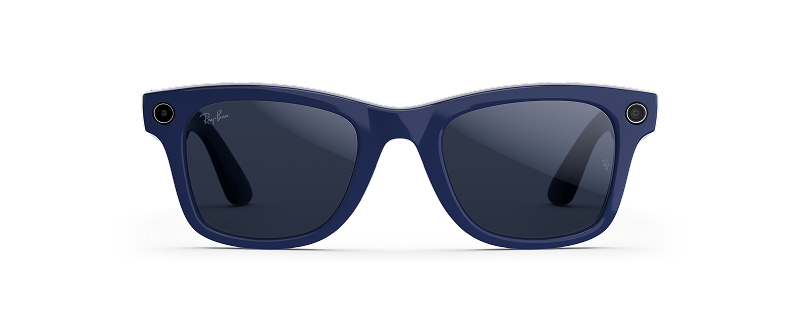
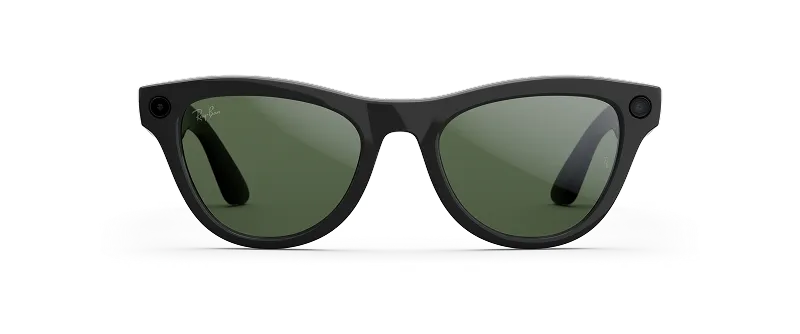
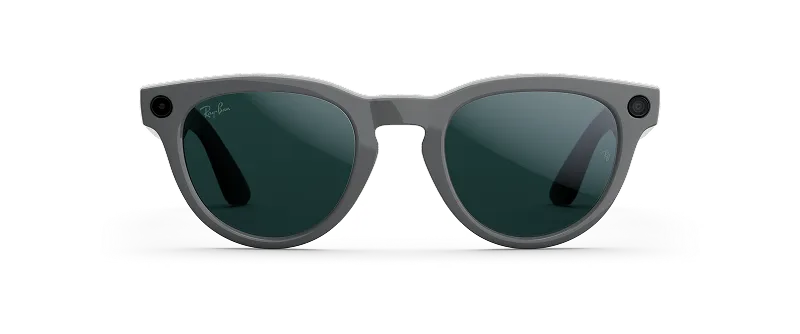
Discover the new Ray-Ban Meta
Upgrade your style with the #1 selling AI glasses, now with longer battery life
and improved video quality.

tell me about this architecture

Get real-time info, suggestions and reminders with Meta AI. Ask your glasses about landmarks you pass by, for recipes on the go and even to remind you where you parked.
Capture even higher-quality videos
With new 3K Ultra HD resolution and an ultra-wide 12 MP camera, record sharper videos with
richer details—for moments you can’t wait to relive.
3K Ultra HD
With crisp 3K Ultra HD, every detail is recorded clearly, while you stay hands-free and in the moment.
Stabilization
Stabilize videos, or let auto-select do it for you, so recordings look steady even as things get rocking.
Slow motion
Liquid-smooth slow motion adds drama and depth to every moment.
Frequently asked questions
Ray-Ban Meta glasses and sunglasses combine iconic style with the latest in wearable tech, allowing you to capture photos and videos, listen to music with the built-in Bluetooth speakers, interact with AI, and stay connected with calls or texts using just voice commands.
The glasses pair with the Meta AI mobile app, allowing you to view, share, and save photos and videos, as well as manage your settings. With Meta AI* built directly into the app, you can interact with the Meta AI assistant both with the glasses and in the app.
*Certain Meta AI features only available in select countries and languages.
- Smartphone—Android 10 or above (with location services enabled) or iPhone 10 or above (running iOS 14.4 or above). Review the complete list of
compatible devices.
- Wireless internet access
- USB-C charging cable and a plug (if charging from a power outlet and not directly from a USB port)
- A valid Meta account
- The Meta AI app (download from the Apple and Google Play app stores)
Learn more about getting started with your AI glasses .
You can use many of the features of your AI glasses whether they’re connected to the internet or not. An internet connection is required to use Meta AI.
Yes, you need to download the Meta AI app to begin using the features on your glasses, such as taking and sharing photos. Download the The Meta AI app either from the Apple app store or Google Play app store.
You can buy Ray-Ban Meta glasses (Gen 1 and Gen 2) in the United States, Canada, United Kingdom, Australia, France, Italy, Spain and Germany via the Meta website and other certified Meta retailers.
They’re also available on Ray-Ban.com, at official Ray-Ban stores and from certified Ray-Ban dealers (online and in store). Currently they’re available for purchase in the United States, Canada, United Kingdom, Ireland, Austria, Belgium, France, Italy, Spain, Germany, Finland, Norway, Denmark, Sweden and Australia.
Ray-Ban Meta glasses and sunglasses (Gen 1 and Gen 2) range in price depending on the style. Specific lenses and prescriptions may cost more. Find the right pair for you by visiting our shop all page.
Ray-Ban Meta (Gen 2) features the following upgrades:
- 2x the battery life compared to Gen 1
- 3K Ultra HD video with 6.4 million pixels
Powered by Meta AI, you can say “Hey Meta” and have your glasses answer questions in real-time, get information, make suggestions and set reminders.
- Hey Meta, what will the weather be at 6 PM tonight?
- Hey Meta, what I can make with these ingredients?
- Hey Meta, tell me about this dog breed.
- Hey Meta, translate that sign.
- Hey Meta, write an Instagram caption for this view.
- Hey Meta, give me pricing options and reviews for this toaster.
Voice commands and voice chatbot are available in 6 languages and counting. Meta AI is available in select countries.
Yes, you can make and receive phone calls with all Ray-Ban Meta glasses. The glasses feature an integrated Bluetooth speaker and microphones allowing you to be heard clearly on calls with 90% of background noise blocked.
Ray-Ban Meta glasses and sunglasses (Gen 1 and Gen 2) have discreet open-ear speakers that let you listen to music, podcasts and other audio content without needing earbuds or headphones. You can stream audio directly from your phone via Bluetooth.
Open-ear audio lets you hear your surroundings while still enjoying private audio through the glasses. The speakers are positioned just above your ears, directing sound toward you without completely blocking out ambient noise. These Bluetooth capabilities are perfect for staying aware of your environment while listening on the go.
Ray-Ban Meta glasses (Gen 1 and Gen 2) connect to your phone via Bluetooth, letting you play music and audio content through the built-in directional speakers. You can also control playback and volume using the touchpad on the right temple or with voice commands.
Audio from Ray-Ban Meta glasses is directional and designed to be heard primarily by you. In quiet environments or at higher volumes, others nearby may hear faint sound, but it’s generally not disruptive.
Yes, the ultra-wide 12MP camera on Ray-Ban Meta glasses (Gen 1 and Gen 2) takes high-quality photos and can record videos for up to 3 minutes. Ray-Ban Meta (Gen 2) records video in 3K Ultra HD resolution and Ray-Ban Meta (Gen 1) records video in 1080p resolution. The LED privacy light on your AI glasses lets people know when you’re taking a photo or capturing video to ensure their privacy is respected (if the LED is covered up, the camera will not function). All photos and videos are imported to your smartphone via the Meta AI app.
Yes, you can take photos and videos with Ray-Ban Meta AI glasses (Gen 1 and Gen 2).
To take a picture, press the capture button on your glasses frame or say “Hey Meta, take a photo.” For video, press and hold the capture button or say “Hey Meta, take a video.” When you take a photo or video, the capture LED light activates to indicate to others that you’re recording.
The default video length is 3 minutes, but you can change the default length to be shorter in the Meta AI app.
To change video length:
- From the Meta AI app, tap the bottom left of the screen.
- If you have multiple devices paired with the Meta AI app, swipe left or right to select the device you want to adjust.
- Tap Device settings.
- Tap Media.
- Tap Video length.
- Tap the video length default you want.
With live translation on Ray-Ban Meta glasses (Gen 1 and Gen 2), you can converse in real-time between French, Italian, Spanish, English, Portuguese, German and more. Translations are audible through your glasses and visible as a transcript on the Meta AI app.
Ray-Ban Meta (Gen 1):
- Fully-charged Gen 1 glasses provide up to 4 hours of moderate usage and up to 3 hours 20 minutes of continuous audio playback via built-in Bluetooth speakers. This may vary with use and other factors.
- You can fully charge the glasses in about 75 minutes in the charging case.
- You can quickly charge up to 50% in 22 minutes in the charging case.
Ray-Ban Meta (Gen 2):
- Fully-charged Gen 2 glasses provide up to 8 hours of moderate usage and up to 5 hours of continuous audio playback via built-in Bluetooth speakers. This may vary with use and other factors.
- You can fully charge the glasses in about 75 minutes in the charging case.
- You can quickly charge the AI glasses to 50% in 20 minutes in the charging case.
Charging case:
- A fully charged case provides up to 48 additional hours of battery life for Gen 2 and 32 additional hours of battery life for Gen 1. The number of hours varies according to how you’re using the features.
- You can fully charge the case in 3.5 hours using a USB-C cable.
Read more on how to charge your Ray-Ban Meta glasses.
Place your glasses in the charging case with the nose bridge of the glasses connected to the charging port. You’ll know your glasses are charging when the case LED blinks after you’ve docked the glasses and closed the case.
Each generation of of Ray-Ban Meta glasses has an identical case, but the battery life provided varies depending on which model of glasses you have.
Ray-Ban Meta glasses (Gen 1 and Gen 2) and sunglasses are water resistant with an IPX4 rating. They’re not designed for submersion or extended exposure to water or other liquids. In case of water exposure, dry the product thoroughly and clear the charging areas of residue and other debris.
The charging case is not water resistant and should not be exposed to liquids, as this could lead to damage or injury.
Yes, Ray-Ban Meta glasses (Gen 1 and Gen 2) are prescription-lens compatible. You can buy a new pair with prescription lenses included or add a prescription to your existing Ray-Ban Meta glasses at a certified retail location. Learn more about prescriptions.
You’ll find Ray-Ban Meta health and safety information in the warranty and safety document included with your glasses, or you can also find it online.
No, Ray-Ban is not owned by Meta. They’re two independent companies who collaborate to create the Ray-Ban Meta glasses collection.
Ray-Ban Meta glasses are for ages 13 and up. You can find more details in the warranty and safety information.
Find additional privacy and data information in the Meta Help Center and our Privacy Center.
Ray-Ban Meta glasses provide helpful utility to those with reduced vision, hearing and mobility by offering the ability to perform tasks hands-free that typically would require handling a phone.
For instance, with Ray-Ban Meta glasses you can make an audio or video call, send a text message and take a photo all using your voice. Some audio cues are also delivered visually through light indications on the inside of the frames. The glasses are also available with prescription lenses.* You can even use your glasses to connect with the Be My Eyes® network to get assistance from a sighted volunteer.
*Some sun lens colors are not available in prescription. Prescription range is -6.00 to +6.00 total power. Must have a valid prescription to order.
Learn more by exploring all the styles available and visiting their product pages.
Standard returns:
Our standard return policy is 30 days from when you receive your order. Once your Ray-Ban Meta glasses are returned, they will be inspected and a refund to your original payment method will be issued. Shipping fees are non-refundable.
If you purchased your Ray-Ban Meta glasses from Meta.com, you can use our Find order page to identify your purchase and start a return.
If you purchased your AI glasses from Ray-Ban.com, please contact them to request a refund. Returns are subject to the original retail store’s return policies.
Warranty returns:
If you think your AI glasses are defective and the return timeframe has expired, you can open a warranty claim with Ray-Ban for a repair or replacement. To open a claim you’ll need your product serial number and proof of purchase. The warranty is only valid for one or two years from purchase, based on the country of purchase.
You can find further information and support contact details via the Meta Help Center.
Yes, Ray-Ban Meta glasses are compatible with both the iPhone (iOS 14.2 and above) and Android devices (Android 10 and above).
The new Ray-Ban Meta glasses (Gen 2) come in new color options, include an upgraded camera with 3K Ultra HD video resolution and have a 2x longer battery life. Shop and compare all AI glasses.
Smart glasses incorporate technology that often allows users to listen to audio, make and receive calls and capture pictures and video hands-free. AI glasses are smart glasses that also function as a wearable AI assistant, providing things like language translation, visual recognition, voice-based search and more.
Yes, Ray-Ban Meta glasses are available in progressive lenses. Progressive lenses are designed for people who require more than one vision correction, such as nearsightedness and farsightedness. The surface of the lens has different prescription areas but appears completely seamless.
To clean and maintain your Ray-Ban Meta glasses, use a soft, dry cloth to wipe down the frames and lenses. Avoid using cleaning chemicals, abrasive materials or water, as these can damage the glasses.
If you accidentally damage your Ray-Ban Meta glasses, please contact our customer support team for assistance. We offer repair and replacement services for damaged glasses, subject to certain terms and conditions. See warranty information or contact customer support.
Yes, you can use your Ray-Ban Meta glasses internationally, but please be aware of local laws and regulations regarding their use. Some countries may have specific restrictions or requirements around smart glasses, so it’s essential to research local regulations before traveling.
Yes, you can return or exchange Ray-Ban Meta glasses within 30 days of purchase.
The memory in Ray-Ban Meta glasses is used to store photos, videos and audio recordings captured by the glasses. The memory also enables features like voice commands and text-to-speech.
Ray-Ban Meta glasses come with 32GB of internal storage.
Yes, once you set up your glasses and pair them with the Meta AI app on your phone, you can enable automatic updates. The glasses will download and install updates when certain conditions are met, such as:
- The glasses are connected to a power source.
- The glasses are connected to a Wi-Fi network (via the Meta AI app).
- The glasses are not in active use.
- The battery level is at 20% or above.